Imagine arriving at work one morning only to discover that you can no longer access your business email, important files or company systems. Even worse, someone else has gained access to your accounts.
Unfortunately, this is a situation many businesses face. Cybercriminals are constantly looking for ways to access business accounts, and passwords remain one of their most common targets.
While using strong passwords is an important first step, passwords alone are no longer enough to protect your business.
So, what can you do to improve your company’s security?
Let’s take a closer look.
1. Why Passwords Alone Are Not Enough
Many businesses still rely on passwords as their primary method of protecting important accounts.
However, even a strong password can be compromised.
Cybercriminals use several methods to obtain passwords, including:
- Phishing emails: Fake emails designed to trick employees into revealing login details.
- Password reuse: Using the same password across multiple websites and services.
- Data breaches: Stolen passwords from other websites may be used to attempt access to business accounts.
- Brute-force attacks: Automated attempts to guess passwords.
Even if your employees use complicated passwords, a single mistake can put your business at risk.
That’s why businesses need to look beyond passwords alone.
2. Enable Multi-Factor Authentication (MFA)
One of the most effective ways to improve account security is to enable Multi-Factor Authentication (MFA).
MFA requires users to verify their identity using an additional method, such as an authentication app or security key, when signing in.
For example, even if someone manages to obtain an employee’s password, they may still be unable to access the account without the additional verification.
MFA is particularly important for:
- Business email accounts
- Microsoft 365 accounts
- Remote access systems
- Cloud storage platforms
- Administrator accounts
Whenever possible, businesses should use an authenticator app or security key rather than relying solely on SMS verification.
3. Stop Reusing Passwords
Using the same password for multiple accounts may seem convenient, but it creates a significant security risk.
If one website experiences a data breach, criminals may try the stolen password on other services.
For example, if an employee uses the same password for their personal email and business account, a breach of their personal account could potentially put the business at risk.
Every business account should have a unique password.
A password manager can help employees generate and securely store strong, unique passwords without having to remember every single one.
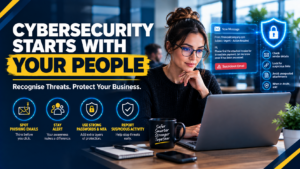
4. Educate Employees About Phishing
Technology alone cannot prevent every cybersecurity incident.
Employees also play an important role in protecting business information.
Phishing emails are designed to look legitimate. They may appear to come from a supplier, colleague, bank or even the company’s management team.
These messages often encourage recipients to click a link, open an attachment or provide login details.
Businesses should educate employees on how to identify suspicious emails and encourage them to verify unexpected requests before taking action.
A few seconds of caution can help prevent a serious security incident.
5. Protect Your Business Email
Business email accounts are valuable targets for cybercriminals.
If an attacker gains access to an employee’s email account, they may be able to read confidential correspondence, impersonate the employee or attempt to deceive customers and suppliers.
Businesses should consider multiple layers of email protection, including:
- Multi-factor authentication.
- Spam and phishing protection.
- Regular security updates.
- Monitoring for suspicious login activity.
- Employee awareness training.
Email security should form part of your overall cybersecurity strategy, not be treated as a separate afterthought.
6. Keep Your Systems Updated
Outdated software can expose businesses to security vulnerabilities.
Regular updates help address known security weaknesses and improve the reliability of your systems.
Businesses should ensure that operating systems, applications and security software are kept up to date.
It is also important to review user accounts regularly and remove access that is no longer required, particularly when employees leave the company or change roles.
7. Monitor Your Business Accounts
Even with strong passwords and MFA, businesses should remain alert to suspicious activity.
Unusual login attempts, unexpected password resets and unfamiliar devices accessing company accounts may indicate a security issue.
Monitoring and alerting tools can help identify suspicious activity so that it can be investigated promptly.
Having a plan for responding to suspected account compromise is equally important. Employees should know who to contact and what steps to take if they believe their account has been compromised.
Conclusion: Protect Your Business Beyond the Password
Strong passwords are still an essential part of cybersecurity, but they should never be your only line of defence.
By combining unique passwords, multi-factor authentication, employee awareness, email protection and ongoing monitoring, businesses can significantly improve the security of their accounts.
Cybersecurity is not a once-off task. It requires regular attention, the right tools and a proactive approach.
Taking these steps today can help reduce the risk of costly disruptions and protect your business information.
Need Help Securing Your Business?
At Paradox IT, we understand how important your business data and systems are. Our managed IT services help businesses improve their security, monitor their systems and keep their technology running smoothly.
Whether you need assistance with Microsoft 365 security, endpoint protection or ongoing IT support, our team is here to help.
Contact Paradox IT today to discuss how we can help protect your business.